Introduction
COD 207 Creative Coding I is a foundational course designed to introduce students to the essential principles of programming within the realm of creative coding. Through hands-on experiences with algorithmic art practices, students will gain a comprehensive understanding of the fundamental concepts that underlie this innovative field.
Course Objectives:
- Develop Programming Fundamentals: Students will learn the basic syntax and structure of programming languages, focusing on problem-solving skills and logical thinking.
- Explore Algorithmic Art Practices: Through interactive exercises and projects, students will delve into the world of algorithmic art, understanding how to create visually striking and dynamic visualizations using code.
- Apply Creative Coding Principles: By applying creative coding principles to real-world scenarios, students will develop a unique perspective on problem-solving and artistic expression.
Office Hours
Refer to the following link. Create a request. I will provide you the details. Booking link
Links
Selected Student Assignments Showcase Under Construction…
Selected Student Final Projects
||| Student Works - Creative Coding ||| - YouTube
Course Content:
Week 1: Introduction to Creative Coding
- Why do I need to learn programming? Interview with Ali Nesin
- Overview of programming languages (Python, JavaScript, etc.)
- What is Creative Coding? Present artists…
- Pre-survey ALAP
Things to Discuss
This discussion session aims to present basics of Computational Thinking principles. The practices are chosen in order to align with the undergraduate student major. Since design students are visual learners, the tenets of CT are contextualized to provide visual aids and analogies depending on student’s known practices.
1. Abstraction
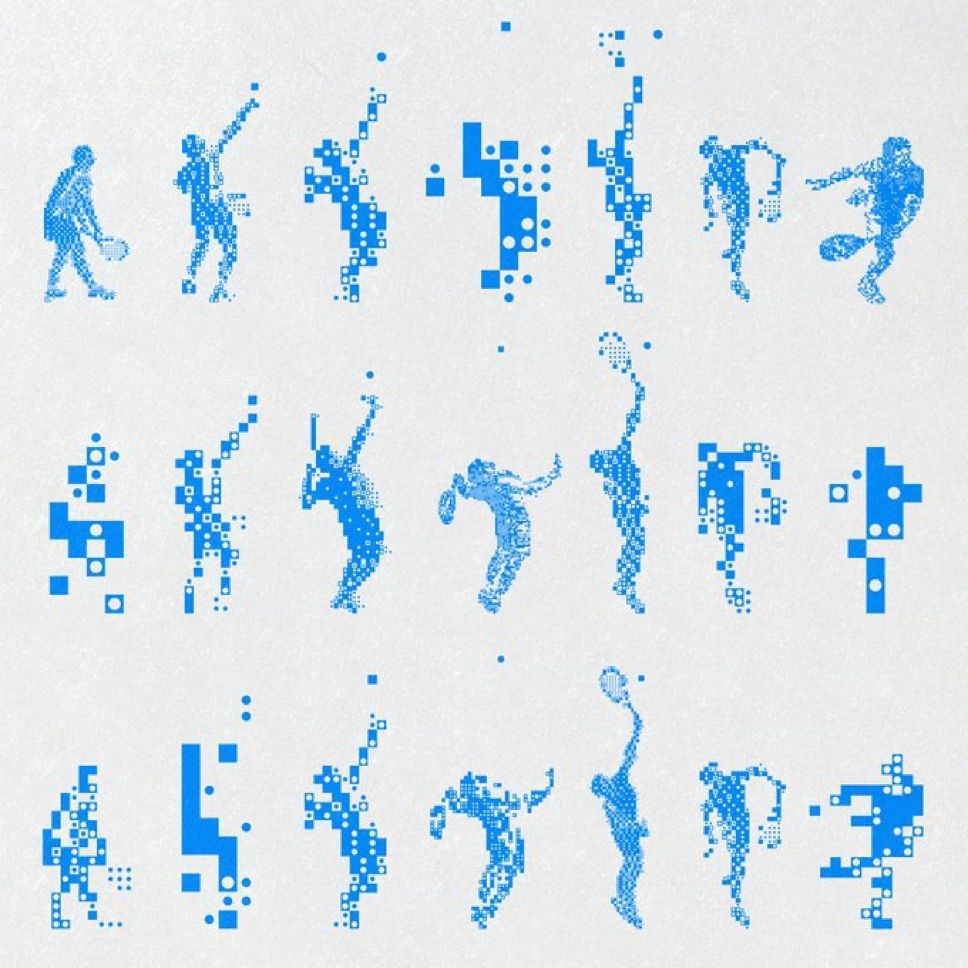
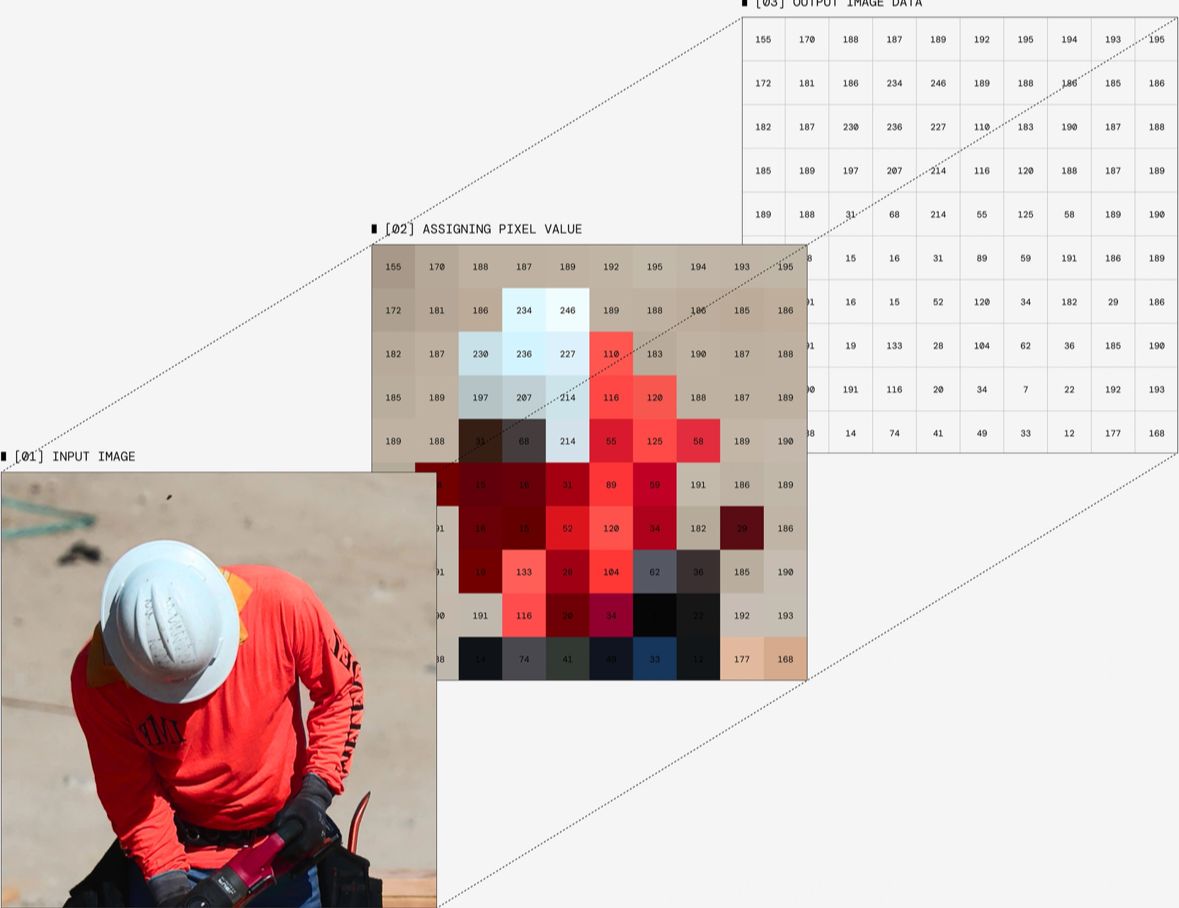
Abstraction is crucial in order to reveal the core of the problem. The abstraction process eliminates the unnecessary data and help the designer to focus on the major task to solve the problem.
Procedural Flow
This step is crucial for determining the clean and precise instructions to solve a problem.
Suppose that you instruct your intern about how to use Adobe Photoshop.
Write down step-by-step instructions precisely for the following tasks;
- How to create a 800 x 800 px sized, 72 DPI resolution canvas using Photoshop on Mac or Windows operating system.
- How
Week 2: Algorithmic Art Database
When the speech is corrupted so is the mind.
- Keep mails short and readable
- Don’t expect answer on weekends and after 5 pm
- ALAP website introduction. Familiarize yourself.
- Cheat Sheet
- Artist of the week Memo Akten - Showcase
- Inspiration
Week 3: Computational Thinking
- Artist of the week Char Stiles Keynote speech on Creative Coding Fest.
Week 4: Moire Pattern
Several topics are reviewed during the class work on the creation Moire Pattern study.
- Why does it matters to gain knowledge? - Ali Nesin (org video, 55:10)
- Artist of the week. Audiovisual work of Telefon Tel Aviv band is showcased.
Week 5: Algorithmic Art Praxis
-
Presentation: Week 05 - Randomness & Nested Loops and Algorithmic Art Praxis
-
Artist of the week: Larry Cuba - Calculated Movements (complete film) - YouTube
Week 6: National Holiday (Republic Day)
Week 7: Media Loading
-
Presentation: Week 06 - Media - Images
-
Artist of The Week: Patrik Hübner Generative Poster Project
Week 8: Image Processing
- Presentation: week07_cod_207-Image-Processing
Week 9: Typography
- Presentation: Week 08 - Typography - Slidev
- Quiz (Three questions, section A)
- Quiz (Three questions, section B)
Week 10: Sound & Interactivity
- Presentation: Week 09 Sound Interactivity - Slidev
Week 11: ALAP & Autonomous Agents
- Presentation Autonomous Agents: Week 11 Autonomous Agents + Oscillations - Slidev
- Presentation ALAP: Algorithmic Art Praxis - Slidev
Final Project Instructions
1. Project Template Document
Your final project document must include the following information. Please complete every section to avoid losing points.
Course: COD 207 Creative Coding I
Student Name/Surname: [Your Name]
Project Title: Provide a title for your work. (You may update this after receiving feedback).
Mood Board: Include your mood board here. If you are using Miro, Notion, or another cloud-based app, please add a screenshot and a public link so I can access it.
Project Type: What is the category of your project? Choose one of the following or propose your own:
- Generative Art:
- Abstract digital painting
- Animated loops (GIFs)
- Plotter drawings (vector-based designs for print)
- Computational Design:
- Generative poster design
- Generative cover design
- Generative book covers
- Algorithmic typography or logo design
- Interactive Media:
- Mini-games (Educational, advergame, casual game, puzzle game, etc…)
- Mouse/Keyboard interactive visual systems
- Audio-reactive visuals (Music visualizer)
- Data Visualization:
- Visualizing personal data (e.g., screen time, steps)
- Abstract mapping of external datasets
- Generative Collage:
- Remixing images and shapes using code
- Other:
- If you have a unique idea not listed here, please explain it in detail.
Project Description:
Write a comprehensive description of your project. This section should cover:
- Concept: What is the core idea or theme?
- Technical Approach: Which coding techniques and tools are you using? Why did you choose them?
- Connection: How does the technical approach support your concept and mood board?
Do not write these as separate bullet points; please write them as a cohesive paragraph.
2. Final Project Video Documentation
You must screen-record your project. The video resolution must be at least 1920x1080 px.
- Audio/Text: Use subtitles or a voiceover to briefly explain your work.
- Content:
- If it is artwork, explain your inspiration and motivation.
- If it is a design (poster, book cover, etc.), explain the context and usage.
- Goal: The video must clearly demonstrate how the project works to an audience who has never seen it before.
3. Source Code & Outcomes
- Download your source code from p5.js or OpenProcessing.
- Rename the downloaded
.zipfile using your name and surname.- Example: sketch-alptugan.zip
4. Submission Instructions
- Create a folder on your computer named with the course code, your name, and surname.
- Example: alptugan_cod207_A
- Place your Final Project PDF, Video Documentation, and Source Code (.zip) inside this folder.
- Upload the folder to the Google Drive link provided below.
- DO NOT UPLOAD THE FILES DIRECTLY TO THE LMS.
- Once uploaded to Drive, copy the link to your folder and paste it into the LMS submission box.
GRADING POLICY
As stated in the course syllabus, the final project accounts for 30% of your final grade. You will be evaluated based on the following criteria:
| Description | Points |
|---|---|
| Detailed Comments in the Code (Is the code explained clearly via comments?) | 20 PTS |
| Aesthetics & Design (Visual balance, composition, and theoretical grounding) | 40 PTS |
| Project Document, Description & Analysis (Quality of the project document and computational thinking) | 20 PTS |
| Video Documentation (Clarity, resolution, and explanation) | 20 PTS |
| TOTAL | 100 PTS |
Useful Links
- Check tutorials CodeGuppy → Coding for middle school and high school students | Free coding platform
- How to name variables, functions and file names? (ref: Naming Conventions)
Articles & Tutorials
Decontextualize blog includes several programming concepts from beginner to intermediate levels for novices.
List of colors and their meaning, article
Transformation
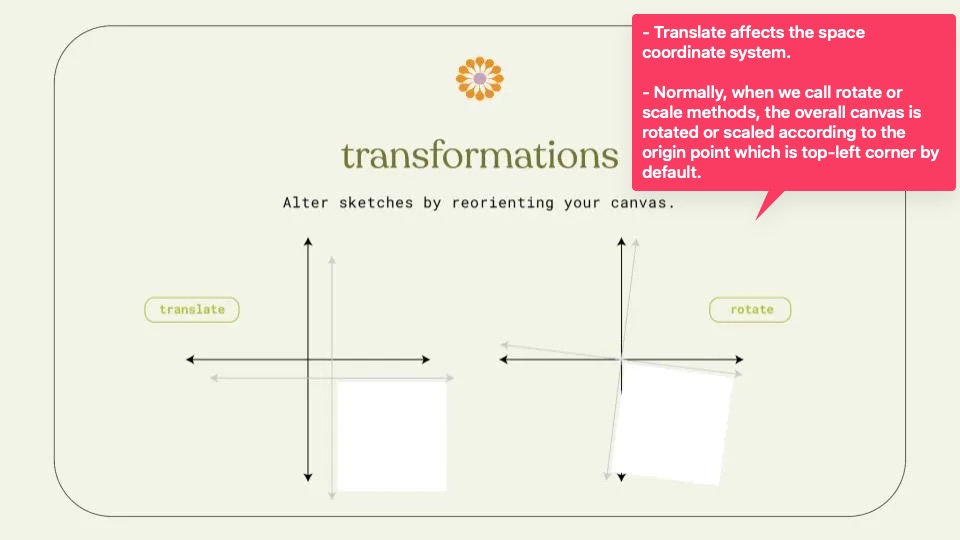
Check the following content for case studies!
Inspiration & Showcases
Pre-computer Era
- Hilma af Klint - Wikipedia
- Kazimir Malevich - Wikipedia
- Piet Mondrian - Wikipedia
- Wassily Kandinsky - Wikipedia
Generative Art
- REAS.com is a database for Casey REAS
- Daily Sketches in 2016. (note: this article has a fair number… | by zach lieberman
- Shan, Shui Infinite procedurally generated Chinese landscape painting by Lingdong Huang, 2018. Huang is one of the exceptional generative artists for our time (2025).
- Mokafolio – Weird Faces
- Mokafolio – Regurgitating
- aBe - Ink waves decoded Plotter-based art.
- Reza Ali
- Suskia Freeke - Daily Art In “Two Years Making Daily Art,” @sasj_nl reflects on their transformative journey of creating art daily for two years. The author highlights how this consistent practice significantly improved their artistic skills, helped them overcome perfectionism, and allowed them to embrace imperfection and experimentation. Key takeaways include fostering creative discipline, discovering a personal style, using art as a form of mindfulness, and emphasizing that the most important aspect is showing up consistently rather than striving for perfect results. The experience ultimately built both technical ability and mental resilience.
- Tyler Hobbs - Fidenza
- Feral File NFT art gallery
- b2renger - Grids galore! Experiments with p5js on pattern, generative and grid design
- Patrik Hübner Generative Poster Project
Datavis
- Wind Map Showcases wind map in an interactive way in US.
- Fathom Information Design A company focuses on data visualization.
- THE PROJECT — Dear Data Each week, and for a year, we collected and measured a particular type of data about our lives, used this data to make a drawing on a postcard-sized sheet of paper, and then dropped the postcard in an English
Crowdsourcing
Installations
- Keyfleas – Interactive augmented projection by Miles Peyton represented at CreativeApplications.Net
- teamLab Borderless TOKYO, Azabudai Hills
- Tega Brain is an academic and artist. Co-author of the “Code as Creative Medium” book.
Fabrication
- Nervous System
- Filament Sculptures – LIA
- Wanderers – Digitally grown 3d printed wearables that could embed living matter – CreativeApplications.Net
- Tactum — MADLAB.CC Design 3D items for yourself on your body.
- Iridescence · Behnaz Farahi The custom-made quills flip their colors and start to make patterns, in response to the movement of onlookers and their facial expressions. physicalComputing
- Alicia Eggert physicalComputing
Motion Graphics
- Individuation – Robert Hodgin
- Painting with Watercolours using openFrameworks FBO – Kenichi Yoneda (Kynd) – CreativeApplications.Net
Projection
- swoosh
- Projects – Studio Lemercier
- advection | robert seidel | projection on a water fountain | lichtsicht biennale 2013/2014
- OMOTE / REAL-TIME FACE TRACKING & PROJECTION MAPPING
- Title Unavailable | Site Unreachable
- Wooden Drum • Patrik Hübner - Generative Design and Creative Coding for brands
- NOTA BENE Visual | Digital Experiences
- Delicate Boundaries – Chris Sugrue
Performance
- Superposition—5.84 Quintillion Facets of the Digital Sublime – CreativeApplications.Net, Ryoji Ikeda
- discrete figures -ELEVENPLAY×Rhizomatiks Research×Kyle McDonald
- DeepTalking - Tiri Kananuruk | Tiri Kananuruk
- Apparition, Part 1 (2004) – Klaus Obermaier & Ars Electronica Futurelab - YouTube
- S20 Hiroaki Umeda
- Kekko Fornarelli - CHRYSALIS | The Performance - YouTube
- Primary Assembly physicalComputing
Public Domain & Intervention
-
About | F.A.T. The Free Art and Technology (F.A.T.) Lab is an organization focused on enhancing the public domain by researching and developing technologies and media. They emphasize releasing their work early, frequently, and with rap music.
-
THEORY - Face to Facebook (2012) Social networking platforms like Facebook are inherently addictive, capitalizing on our innate desire for connection and self-positioning by creating an “eternal party” where users constantly update their virtual identities. While these private corporations profit immensely from this “crowdsourced targeting” of user data, especially our public-facing profile pictures, this system also exposes individuals to significant risks like identity theft and re-contextualization of personal data, ultimately revealing the inherent fragility of virtual identities and the unsustainable economic model built upon their exploitation.
-
Graffiti Research Lab (2009) “Art is a tool of empowerment and social change, and I consider myself blessed to be able to create and use my work to promote health reform, bring awareness about ALS and help others.” ~ Tempt One
-
Zoom Escaper Online meeting jammer.
Sound & Music
-
Hatnote Listen to Wikipedia This system provides an interactive audio-visual representation of Wikipedia’s recent changes: bells signal additions, string plucks indicate subtractions, and pitch reflects edit size. Green circles denote unregistered users, purple circles mark bot edits, and a string swell announces new users, who can be welcomed via a clickable blue banner.
-
Sound Affects performance A duo performance. Sound generated via face mimics and heartbeat.
-
Symphonies of the Planets Sound composition according to planet orbits.
-
Sidewalk Orchestra Motion detection on camera images trigger sound samples to create experimental musical composition.
-
Patatap - Artistic & Studio Work of Jono Patatap, real-time audio-visual instrument available on the web and the App Store. On computer click on the screen and then tap any key on your keyboard.
-
TONECRAFT BY DINAHMOE-Transforming silence into unappreciated effort. A 3D sequencer for musical composition by DINAHMOE
-
ÜBERVIZ The studio builds custom real-time audio-reactive music visualizers, using web technologies such as WebGL, Web Audio, and custom GLSL shaders. They also build live concert visuals and interactive installations.
Typography
-
Reconstitution Transforming political debates into an immersive experience that revealed hidden patterns and deepened civic engagement. by SOSO Limited Studio.
-
Text Player An original installation by María Güell, and LA INVISIBLE Lighting Design Studio. MoebiusSurfing coded a C++ tool to layout and animate text files and render the used videos.
-
the html review 04 An online experimental journal.
-
THE EXPERIMENT IS DEMOCRACY. FASCISM IS THE CONTROL. Kinetic typography by YOUNG-HAE CHANG.
-
Schultzschultz - Design studio from Frankfurt Touchography, early prototype, instagram post, post2
OpenCv
-
Augmented Hand Series - Interactive Art by Golan Levin and Collaborators (2014), The “Augmented Hand Series” by Golan Levin, Chris Sugrue, and Kyle McDonald is a real-time interactive software system that transforms visitors’ hands. Users insert their hand into a box, and a screen displays a ‘reimagined’ version, such as one with an extra finger or autonomously moving fingers, creating playful, dreamlike, or uncanny effects. Critically, these are “hand-aware” visualizations that operate within the logical structure of the hand, fundamentally altering its deep appearance rather than just applying superficial changes.
-
Face Substitution (2012)
AI
- DREAM RECORDER — MODEM Dream Recorder is an open-source venture by Modem. Developed in close collaboration with Mark Hinch (software & hardware), Ben Levinas and Joe Tsao (industrial design), and Alexis Jamet (illustrations). source: dream-recorder
- Memo Akten – Artist working with code, data and AI
Hypertext / early net.art
- Some inspiration on Rhizome and Dia.
- MTAA Simple Net Art Diagram - context “Art made online exists solely if realized by both author and viewer, since an experience of the work is possible only once, or if, it is accessed. Until then, its location remains undefined and unmapped, without any physical manifestation.” (Tribe/Jana, 2006)
- Mouchette
- Olia Lialina, My Boyfriend Came Back From The War
- Olia Lialina, Summer
- http://wwwwwwwww.jodi.org
- Young-Hae Chang Heavy Industries, BUST DOWN THE DOOR AGAIN!
- Zoe Quinn, Depression Quest (fyi some background on gamergate, which this game was the initial flashpoint for)
- Cameron’s World
- Tinderbox Stretchtext Writing System.

More recent net art
- Eva + Franco Mattes - http://0100101110101101.org/
- Image Atlas by Aaron Swartz and Taryn Simon
- I’m Google by Dina Kelberman
- We see in every direction by Jonas Lund
- Clement Valla
- Harm Van Den Dorpel, in particular Ethereal Self
- Directions to Last Visitor, Charles Broskowski
- David Horvitz
- Ann Hirsch
- Claudia Maté
- Bunny Rogers
- Beck Interactive 360 music show
- 3d Particles forming shapes
- The Library of Babel
- The Library of Babel, image version
- Anna Anthropy, maker of autobiographical game Dys4ia and writer of Rise of the Videogame Zinesters
- 10 Examples of High-End Artwork Recreated With Code
GIFs, animations, glitch, video
- Rollin Leonard
- Lorna Mills
- Jeremiah Johnson
- Rafaël Rozendaal http://www.newrafael.com/websites
- Petra Cortright
- Renaissance - 2006 animated film
- Animations for ITV2 British TV Channel
- Lines Horizontal / Norman McLaren
- A Game with Stones / Jan Svankmajer
- Image Atlas
- Islands of Glass / Rob Clouth
Other
- Telescope Dome Control - Arduino Motor Control, Computation of Astral Coordinates
- This app knows how you feel — from the look on your face
- social turkers: crowdsourced dating, Lauren Lee McCarthy
History
Company & Studio
- MODEM
- Filika
- Nerdworking
- DECOL - New Media Studio
- İBB Kültür AŞ Dijital Deneyim Merkezi
- TEMAS TEKNOLOJİ
- KarıncaEvent
- VOYA | Digital Product Design Studio / Dijital Deneyim Stüdyosu
- DEM - Dijital Deneyim Tasarımı ve Kültürel Hikaye Anlatımı
- Omotun | Dijital Tasarım Stüdyosu
- ILLUSIONIST- Digital Arts Studio