AURE Beta (WIP) - User’s Guide
A domain-agnostic, open-source, audio-reactive application framework designed for musical live-coding environments. The source code is available at Github/alptugan. AURE is currently available as standalone app for only Mac OS X systems. Since it was built with the creative C++ coding framework openFrameworks, you can compile the source-code relevant to your operating system.
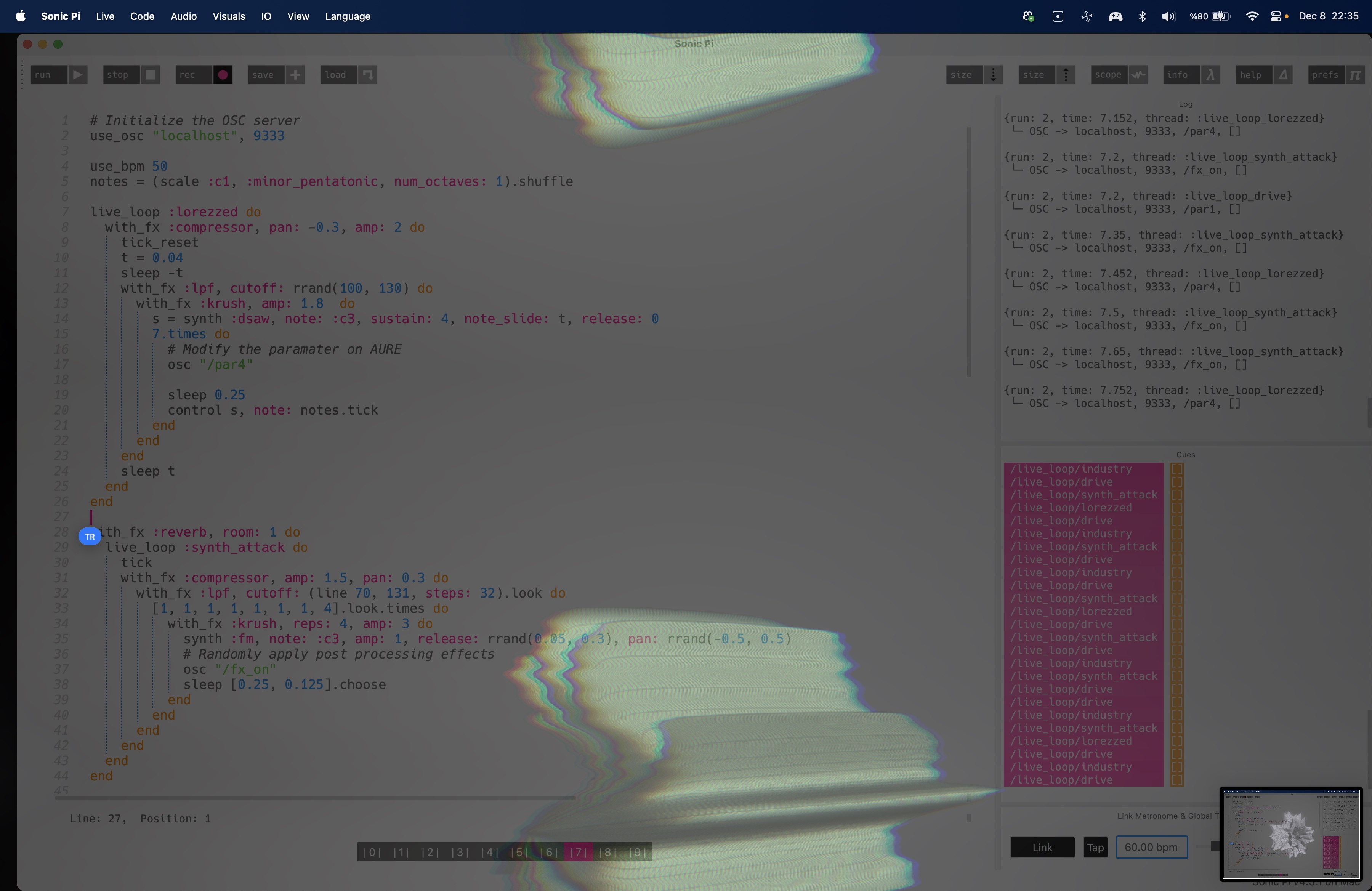
Setup Diagram with Sonic Pi
aure.excalidraw#^group=CkjRjEFppCT0dQ-gG6BVi
Actual setup with Sonic Pi
Add New Scenes
Developers interested in extending the application with additional scenes should consult the developer documentation.
Instructions
- Compile the app using openframeworks or download here for Mac. If your system rejects to open AURE. Follow the instructions or ask it to an LLM for the instructions.
- Open the AURE app and follow the instructions on startup.
- Open Sonic Pi or any other live-coding tool capable of sending OSC
- Set the OSC port 9333 to send messages. Run
use_osc "localhost", 9333on Sonic Pi. - Use osc “/par1” messages to morph scene content inside
live_loopsto sync audio with generative visuals. Refer to “List of Available OSC Commands” section. - Use osc “/fx_on” messages to morph scene content inside
live_loopsto apply post processing effects.
List of Available OSC Commands
You can use the following OSC messages to adjust parameters of the generative visuals on the fly.
| OSC Command | Description |
|---|---|
| /par1 | Modifies a random parameter of the current scene. |
| /par2 | Modifies a random parameter of the current scene. |
| /par3 | Modifies a random parameter of the current scene. |
| /par4 | Modifies a random parameter of the current scene. |
| /par5 | Modifies a random parameter of the current scene. |
| /fx_on | Apply a random post-processing effect. |
| /fx_off | Disable all post-processing effects. |
| /w_full_on | Enable Full Screen Window Mode |
| /w_full_off | Disable Full Screen Window Mode |
| /scene1 | Switch to Scene 1 |
| /scene2 | Switch to Scene 2 |
Control & OSC Reference
- Scene Switching:
- Keyboard: Keys
1to9switch directly to scenes0to8. - OSC:
/scene1,/scene2,/scene3,/scene4, etc. switch automatically.
- Keyboard: Keys
- Scene Parameters (OSC):
/par1to/par5callonPar1()toonPar5()on the active scene./resetcallsonReset()on the active scene.
- FX & Window (OSC):
/fx_on//fx_off: Trigger or disable post-processing shaders./w_full_on//w_full_off: Toggle fullscreen mode.
Dependencies
- openFrameworks
v0.12.0+ - ofxContentsManager
- ofxDaseinCosmos
- ofxEasing
- ofxPostProcessing
- ofxTweenzor
- ofxGui (core version)
- ofxOsc (core version)
AURE Developer Guide
Quick setup and scene creation guide for openFrameworks developers.
1. Prerequisites & Compilation
Refer to the Dependencies section on README.md file.
2. Adding a New Scene
Step 1: Create the Scene Header
Create a new header file in src/ (e.g. src/cN_MyScene.h) deriving from BaseContent.
#pragma once

#include "ofMain.h"
#include "BaseContent.h"
#include "ofxEasing.h"
#include "globalParameters.h"

class c4_MyScene : public BaseContent {
private:
    ofParameter<float> size = {"Size", 100.0f, 10.0f, 500.0f};
    ofParameter<ofColor> color = {"Color", ofColor::white, ofColor(0), ofColor(255)};
    float triggerTime = 0.0f;

public:
    c4_MyScene() {
        initGUI(posGuiConent1);
        gui.add(size);
        gui.add(color);
        loadGUISettings();
        setup();
    }

    ~c4_MyScene() override = default;

    void setup() override {
        // Allocate FBOs, meshes, or load assets here
    }

    void update() override {
        // Update scene animations and logic
    }

    void draw() override {
        ofPushStyle();
        ofSetColor(color);
        ofDrawCircle(ofGetWidth() * 0.5f, ofGetHeight() * 0.5f, size);
        ofPopStyle();
    }

    // --- Optional OSC Hooks (called automatically via /par1 - /par5, /reset) ---
    void onPar1() override {
        size = ofRandom(20.0f, 300.0f);
    }

    void onPar2() override {
        color.set(ofColor(ofRandom(255), ofRandom(255), ofRandom(255)));
    }

    void onReset() override {
        size = 100.0f;
    }
};
Step 2: Register the Scene in ofApp
-
In
src/ofApp.h:
Include the new header and declare the scene pointer:#include "c4_MyScene.h" // Inside ofApp class: c4_MyScene *c4; -
In
src/ofApp.cpp(setup()):
Instantiate the scene and add it tomContentsManager:c4 = new c4_MyScene(); mContentsManager.addContent(c4);